
Introduction
Accessibility on the internet is becoming increasingly important to ensure that digital content is accessible to everyone. People with visual impairments, in particular, often face challenges when trying to use websites, apps, or other digital media. Eye-Able Assist has been specifically developed to provide better accessibility for users with visual impairments. The software offers a variety of visual customization options so that people with visual disabilities can adapt websites to their individual needs. In this way, Eye-Able Assist makes an important contribution to improving digital accessibility.
What is Eye-Able Assist?
Eye-Able Assist is a visual assistance software designed to improve the readability and usability of websites for users with visual impairments.
Blind people typically use screen readers or Braille displays to access digital content. However, for people who do not use their own assistive software, flexible visual adjustments are necessary – and this is where Eye-Able Assist comes into play.
The software allows users to adjust contrast, font size, spacing, and other display options individually so that they can configure the visual presentation according to their personal needs.
Eye-Able Assist was developed in close collaboration with people with disabilities and BFW Veitshöchheim. Numerous interviews and eye-tracking tests contributed to the development to optimally consider the needs of those affected. Additionally, Eye-Able Assist is easy to use.
Features
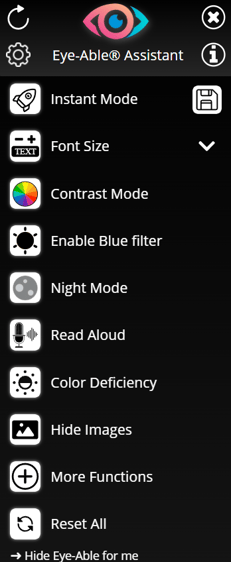
Eye-Able Assist offers a variety of functions to enhance the user experience:
-
Adaptive Zoom: Enlarges the website without affecting the layout. Users can adjust font size, line spacing, word spacing, and text alignment individually.
-
Contrast Mode: Allows users to adjust the contrast on the website to make the text more readable.
-
Blue Light Filter: Reduces the blue light on the screen, protecting the eyes, with individually adjustable intensity and color temperature.
-
Night Mode: Sets all colors to an eye-friendly level, especially for use at night.
-
Text-to-Speech Function: Reads the website aloud, with adjustable speed and volume. Elements can be read out by hovering the mouse or using keyboard commands.
-
Keyboard Navigation: Allows complete navigation of the website via keyboard, even without a mouse.
-
Color Correction: Adjusts colors to support people with color blindness or color vision deficiencies.
-
Font Style: Uses a sans-serif font to improve readability.
Additional features include a larger mouse pointer, hiding images, animations, and sounds.
Technical Basics and System Requirements
The Eye-Able software is developed in JavaScript and works on all modern browsers and devices. It does not require any major changes to the website. The software is simply embedded by adding a script tag in the header. Eye-Able uses a Shadow-DOM to prevent conflicts between website styles and the software’s adjustments.
Configuration is stored in Local Storage, so settings are retained even after restarting the browser. Eye-Able is compatible with all modern browsers, including Google Chrome, Firefox, Microsoft Edge, Safari, Opera, and Tor Browser. It is supported on both desktop and mobile devices.
Installation and Integration
Eye-Able is installed by simply embedding a script tag in the header of the website. The script is loaded asynchronously to avoid affecting the page speed.
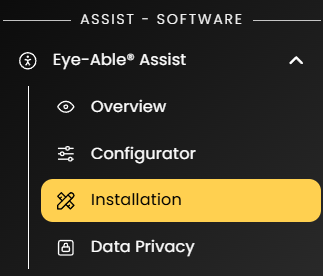
You can find the installation instructions directly in your dashboard under the tab "Eye-Able Assist - Installation."
For more information on integrating Eye-Able Assist, click here for our installation website.
Eye-Able also offers the option to host the software directly on your own web server without external server connections.
A detailed guide for local hosting of Eye-Able Assist can be found in the following article: How to Integrate Eye-Able Assist Locally?
Customization Options
Eye-Able Assist offers numerous customization options for the design and position of the assistive software icon. The icon can be adjusted in various sizes and colors and placed at any desired position on the website. It can also be directly embedded into the existing navigation or other containers of the website.
Some customizations, such as creating custom buttons, can be done using the Eye-Able API. For further customization requests, please feel free to contact our support!
More information on the customization options for Eye-Able Assist can be found in the following articles:
Data Protection
Eye-Able respects privacy regulations and stores all user settings locally in the browser's Local Storage. No cookies are set, and no user data is transferred to external servers. For delivery via the Content Delivery Network (CDN), only European partners are used, ensuring that no personal data is processed outside the EU.
For more information on privacy matters regarding Eye-Able Assist, see the following articles:
Conclusion
Eye-Able Assist offers a comprehensive solution to make websites more accessible for people with visual impairments. With a wide range of features, such as zoom, contrast mode, night mode, and text-to-speech functionality, the software ensures that all users can access the content of a website in a barrier-free way. Additionally, the software offers various customization options to adapt it to the specific requirements of the website and its users.