
Eye-Able Assist can be easily hosted on your own web server without any loss of functionality. To do this, you need to follow a few steps, which are described below:
Installation steps
- You can find the files in the Eye-Able Dashboard under the Assistive Software section in "Installation" → "Hosting on your own server".
- Unzip the files locally on your machine.
- Download your individual JavaScript configuration file from the same "Set Up Local Hosting" popup in the dashboard.
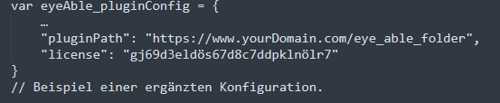
- Upload the public directory with the Eye-Able assets and the configuration file (if not defined inline) to any location on your web server. What's important here are the URLs where the public directory, the eyeAble.js (in the public/js folder), and your configuration file are located. For the sake of this guide, let's assume the path is: "https://www.yourDomain.com/eye_able_folder".
- Change the src URL of the Eye-Able integration in your header accordingly.

- (Optional) If you are integrating Eye-Able Assist via the JavaScript file with "load on click", adjust the two variables eA_path and eA_configPath so that they point to the public folder and the configuration on your web server.
After setup
Eye-Able Assist is now running for your website via your web server.
To update it, simply overwrite the previous public folder with the new version.
Further Information
To learn more about local hosting, read the following articles: