
In this article, you'll learn how to choose your own icon for Eye-Able Assist.
Can the Assist icon be freely selected?
Yes, you can generally choose any Assist icon you like.
However, it is important that the icon remains clearly visible, sufficiently large, and high-contrast. Our standard icon is deliberately designed to be easily recognizable and immediately associated with accessibility.

Alternatively, you have the option to use your own icon. To do so, navigate to Eye-Able Assist > Configurator > Position & Design in the dashboard or follow this link.

There, you can enter the URL of the desired icon.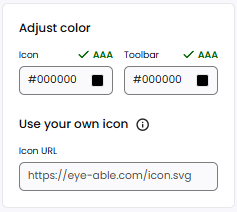
We recommend using an .svg file, as it generally provides the best display quality on different screen sizes.