
Functionality
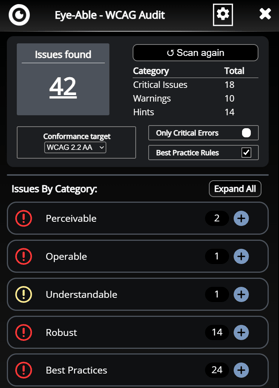
Eye‑Able Audit carries out an automated accessibility check in real time. It tests over 125 criteria, such as contrast ratios, alternative text, link and label text, and the general HTML structure. The Audit Toolbar then displays the number and type of issues and highlights them directly on the page in the browser. Furthermore, Audit provides specific suggestions for resolving the issues. This gives you immediate feedback on where action is needed and how the content can be improved.
Further features and details regarding the audit:
- Issues are listed individually and highlighted in colour.
-
Clicking on an issue takes you directly to the relevant section on the page.
-
Eye-Able Audit provides background information and guidance on how to resolve each issue.
-
The Eye-Able AI assistant, Ally, is available directly within Audit to provide support.
-
When Access integration is active: display of errors resolved by Access
-
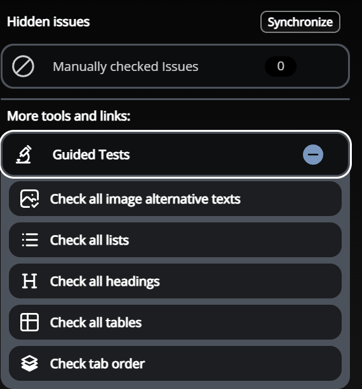
Manually checked issues can be hidden if required and are no longer included in the assessment.
-
Guided tests to check: alternative image captions, lists, headings, tables and tab order
-
Checking of development and access-restricted domains is possible
Further information on Audit’s features can be found in the following articles:
- Does Eye-Able Audit show exactly where an error is?
- Can Audit also be used locally?
- Can the Mobile View also be checked using the testing software?
- Ally: The AI assistant for digital accessibility
- Eye-Able Access Product Overview
Installation and Integration
Eye-Able Audit is usually installed in the browser, directly via the relevant web store. The Eye-Able Audit installation menu in the Eye-Able Dashboard contains direct links to the extensions for Google Chrome, Microsoft Edge and Firefox.
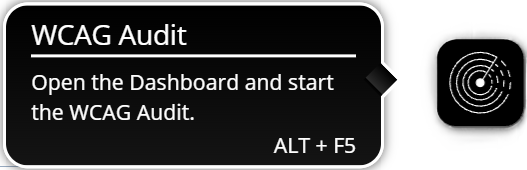
Once the extension has been installed, log in using your Dashboard credentials. Upon logging in, the licences activated for the account are loaded and then displayed in the settings menu. As soon as the extension is installed and activated, an accessibility scan can be started directly in the browser on the licensed websites by clicking on the Audit icon.
Detailed installation instructions can be found in the following articles:
Technical Basis
Eye‑Able Audit is a browser extension that utilises automated testing mechanisms based on the recognised WCAG standards. The software performs more than 125 test steps designed to identify and analyse accessibility issues. The audit takes place directly within the browser, allowing issues to be viewed and addressed in real time. Audit is designed to reliably and systematically identify technical barriers.
Data Protection
Further information on data protection in relation to Eye-Able Audit can be found in the following article: