---
title: Testing the mobile view with the Eye-Able testing software
description: Learn how to test the mobile view with Eye-Able Audit and Report, including mobile mode activation and accessibility scans on mobile layouts.
---
[Skip to content](https://help.eye-able.com/en/can-the-testing-tools-also-check-the-mobile-view#main-content)
- [English](https://help.eye-able.com/en/can-the-testing-tools-also-check-the-mobile-view)
- [Deutsch](https://help.eye-able.com/mobile-ansicht-mit-den-eye-able-prüfsoftwares-prüfen)
English
Show submenu for translations
[ ](https://help.eye-able.com/?hsLang=en)
Open main navigation
Close main navigation
- - [English](https://help.eye-able.com/en/can-the-testing-tools-also-check-the-mobile-view)
- [Deutsch](https://help.eye-able.com/mobile-ansicht-mit-den-eye-able-prüfsoftwares-prüfen)
English
Show submenu for translations
How can we help you?
- There are no suggestions because the search field is empty.
1. [Eye-Able Helpcenter](https://help.eye-able.com/en?hsLang=en)
2. [ Eye-Able Audit ](https://help.eye-able.com/en/eye-able-audit?hsLang=en)
3. [ General questions | Audit ](https://help.eye-able.com/en/eye-able-audit?hsLang=en#general-questions-audit)
# Testing the mobile view with the Eye-Able testing software
## How can I test the mobile view of my website?
The mobile view can be tested with the Eye-Able testing software. There are differences between the two tools, **Eye-Able Audit** and **Eye-Able Report**.
---
### Eye-Able Report
With Eye-Able Report, the mobile mode **must be activated manually by the support team**. If you would like an analysis of your website in the **mobile layout**, please **contact support **directly to have this setting configured.
**You can find further help here:**
- [Contact options for customers and interested parties](https://help.eye-able.com/kontaktm%C3%B6glichkeiten-f%C3%BCr-kundinnen-kunden-und-interessierte?hsLang=de)
---
### Eye-Able Audit
With Eye-Able Audit, you **can test the mobile view yourself**. To do so, use your browser's **developer mode** by following these steps:
- **Right-click** on the page
- Click on** "Inspect"** or **"Inspect element"**
- In the** developer tool **that opens, select a **mobile view**
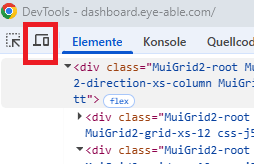
Once the **mobile view is active**, you can run the **accessibility scan** as usual.
- [Eye-Able Assist](https://help.eye-able.com/en/eye-able-assist?hsLang=en#main-content)
- [General questions | Assist](https://help.eye-able.com/en/eye-able-assist?hsLang=en#general-questions-assist)
- [Installation | Assist](https://help.eye-able.com/en/eye-able-assist?hsLang=en#installation-assist)
- [Configuration | Assist](https://help.eye-able.com/en/eye-able-assist?hsLang=en#configuration-assist)
- [Features and Functions | Assist](https://help.eye-able.com/en/eye-able-assist?hsLang=en#features-and-functions-assist)
- [Data Security | Assist](https://help.eye-able.com/en/eye-able-assist?hsLang=en#data-security-assist)
- [Eye-Able Plain Language](https://help.eye-able.com/en/eye-able-plain-language?hsLang=en#main-content)
- [General questions | Plain Language](https://help.eye-able.com/en/eye-able-plain-language?hsLang=en#general-questions-plain-language)
- [Installation | Plain Language](https://help.eye-able.com/en/eye-able-plain-language?hsLang=en#installation-plain-language)
- [Features and Functions | Plain Language](https://help.eye-able.com/en/eye-able-plain-language?hsLang=en#features-and-functions-plain-language)
- [Website module | Plain language](https://help.eye-able.com/en/eye-able-plain-language?hsLang=en#website-module-plain-language)
- [Eye-Able Translate](https://help.eye-able.com/en/eye-able-translate?hsLang=en#main-content)
- [General questions | Translate](https://help.eye-able.com/en/eye-able-translate?hsLang=en#general-questions-translate)
- [Website module | Translate](https://help.eye-able.com/en/eye-able-translate?hsLang=en#website-module-translate)
- [Installation | Translate](https://help.eye-able.com/en/eye-able-translate?hsLang=en#installation-translate)
- [Features and Functions | Translate](https://help.eye-able.com/en/eye-able-translate?hsLang=en#features-and-functions-translate)
- [Data Security | Translate](https://help.eye-able.com/en/eye-able-translate?hsLang=en#data-security-translate)
- [Eye-Able Audit](https://help.eye-able.com/en/eye-able-audit?hsLang=en#main-content)
- [General questions | Audit](https://help.eye-able.com/en/eye-able-audit?hsLang=en#general-questions-audit)
- [Installation | Audit](https://help.eye-able.com/en/eye-able-audit?hsLang=en#installation-audit)
- [Features and Functions | Assist](https://help.eye-able.com/en/eye-able-audit?hsLang=en#features-and-functions-assist)
- [Eye-Able Report](https://help.eye-able.com/en/eye-able-report?hsLang=en#main-content)
- [General questions | Report](https://help.eye-able.com/en/eye-able-report?hsLang=en#general-questions-report)
- [First Steps | Report](https://help.eye-able.com/en/eye-able-report?hsLang=en#first-steps-report)
- [Features and Functions | Report](https://help.eye-able.com/en/eye-able-report?hsLang=en#features-and-functions-report)
- [Content & Web-Analysis | Report](https://help.eye-able.com/en/eye-able-report?hsLang=en#content-web-analysis-report)
- [PDFs | Report](https://help.eye-able.com/en/eye-able-report?hsLang=en#pdfs-report)
- [Generator accessibility declaration | Report](https://help.eye-able.com/en/eye-able-report?hsLang=en#generator-accessibility-declaration-report)
- [Eye-Able Access](https://help.eye-able.com/en/eye-able-access?hsLang=en#main-content)
- [General questions | Eye-Able Access](https://help.eye-able.com/en/eye-able-access?hsLang=en#general-questions-eye-able-access)
- [Installation | Eye-Able Access](https://help.eye-able.com/en/eye-able-access?hsLang=en#installation-eye-able-access)
- [Features & Functions | Eye-Able Access](https://help.eye-able.com/en/eye-able-access?hsLang=en#features-functions-eye-able-access)
- [Accessibility Services](https://help.eye-able.com/en/accessibility-services?hsLang=en#main-content)
- [Workshops & Seminars](https://help.eye-able.com/en/accessibility-services?hsLang=en#workshops-seminars)
- [Accessibility statement](https://help.eye-able.com/en/accessibility-services?hsLang=en#accessibility-statement)
- [Testing](https://help.eye-able.com/en/accessibility-services?hsLang=en#testing)
- [Usability](https://help.eye-able.com/en/accessibility-services?hsLang=en#usability)
- [General information](https://help.eye-able.com/en/general-information?hsLang=en#main-content)
- [Eye-Able Dashboard](https://help.eye-able.com/en/general-information?hsLang=en#eye-able-dashboard)
- [General questions | Accessibility](https://help.eye-able.com/en/general-information?hsLang=en#general-questions-accessibility)
- [General questions | Concact](https://help.eye-able.com/en/general-information?hsLang=en#general-questions-concact)
- [General questions - cross-cutting topics](https://help.eye-able.com/en/general-information?hsLang=en#general-questions-cross-cutting-topics)
- [General questions | Single Sign-On](https://help.eye-able.com/en/general-information?hsLang=en#general-questions-single-sign-on)
- [General questions | AI & AI-Credits](https://help.eye-able.com/en/general-information?hsLang=en#general-questions-ai-ai-credits)
- [Eye-Able IT-Security/Data Security](https://help.eye-able.com/en/eye-able-it-security-data-security?hsLang=en#main-content)
- [IT Security](https://help.eye-able.com/en/eye-able-it-security-data-security?hsLang=en#it-security)
- [Data Protection](https://help.eye-able.com/en/eye-able-it-security-data-security?hsLang=en#data-protection)
- [Technical and Organizational Measures (TOMs)](https://help.eye-able.com/en/eye-able-it-security-data-security?hsLang=en#technical-and-organizational-measures-toms)
- [Data Subject](https://help.eye-able.com/en/eye-able-it-security-data-security?hsLang=en#data-subject)
[](https://eye-able.com/)
[Legal notice](https://eye-able.com/de/impressum)
[Data protection](https://eye-able.com/de/datenschutz-eye-able)
Copyright © 2026, Web Inclusion GmbH