
Introduction
This article describes how you can enable access to all websites in your browser for the Audit browser extension. This is important, for example, so that Audit can be used on all websites for which a license is available.
Steps to grant Audit access for all websites
1. Open the Audit extension in your browser. To do this, click on the puzzle piece icon in the toolbar at the top right of your browser window.

2. Then click on “Manage extension”.

3. This will take you to an overview of your Audit extension. There you can click the “Details” button to open the settings.

4. Scroll down to the “Site access” option.

5. In the drop-down menu on the right, select the option “On all sites”.
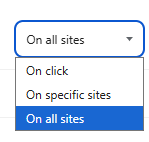
With this setting, Audit is granted access to all websites.