
Installation of Eye-Able Audit (Browser Extension)
Eye-Able Audit is a browser extension for Firefox and all Chromium-based browsers.
You can find the current download link in the Eye-Able Dashboard.
How to Install Eye-Able Audit in Firefox
-
Open the Firefox Add-ons Store
Open the Firefox Add-ons Store Click on the blue button labeled “Add to Firefox.”
-
Confirm the Extension
After clicking, a popup will appear. Confirm it by clicking the "Add" button.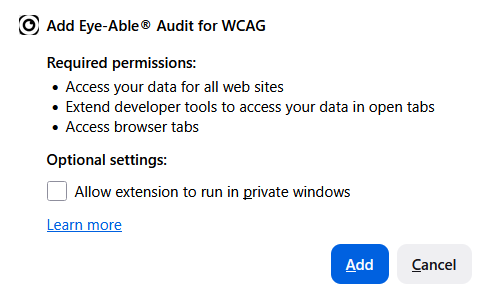
-
Redirect to the Dashboard
After successful installation, you will be automatically redirected to the audit page in the dashboard and the following pop-up window will appear.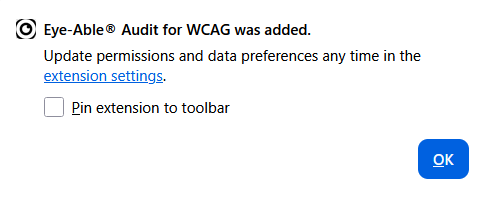
Logging In and License Assignment
-
Open the Browser Extension
Click the puzzle piece icon at the top right of the browser. Select Eye-Able® Audit to open the license menu.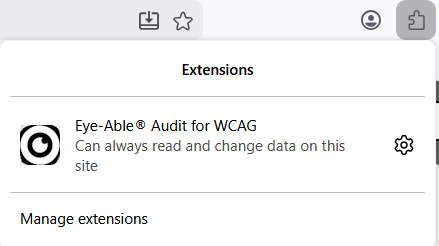
-
Login with Dashboard Credentials
Log in with your dashboard login details. Click "Sign In" to activate your licenses.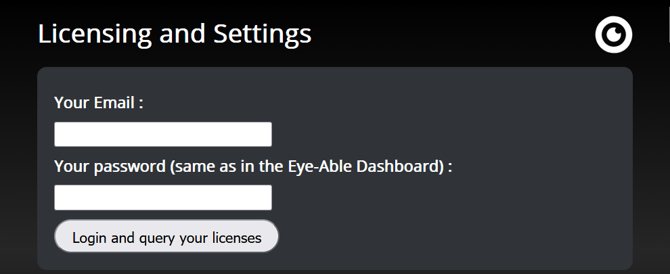
How to Run a Scan
Once you are correctly logged in and on a licensed page, a radar symbol will appear at the bottom right.
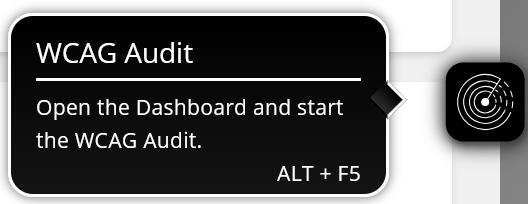
Start the scan via:
-
Click on the radar symbol
-
Keyboard shortcut: ALT + F5
-
Right-click on the page → "Run Eye-Able® Audit"