
The mobile view can be tested with the Eye-Able testing software. There are differences between the two tools, Eye-Able Audit and Eye-Able Report.
Eye-Able Report
With Eye-Able Report, the mobile mode must be activated manually by the support team. If you would like an analysis of your website in the mobile layout, please contact support directly to have this setting configured.
You can find further help here:
Eye-Able Audit
With Eye-Able Audit, you can test the mobile view yourself. To do so, use your browser's developer mode by following these steps:
- Right-click on the page
- Click on "Inspect" or "Inspect element"
- In the developer tool that opens, select a mobile view
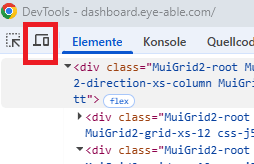
Once the mobile view is active, you can run the accessibility scan as usual.