
In Eye-Able Report, you can set both the weekday and the time of the report scan individually.
How to adjust the scan times
-
Open the Report settings
Log in to the Eye-Able Dashboard and open the Report settings.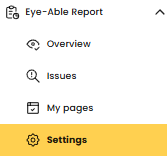
- Navigate to the Time Restrictions
In the Report settings, you will find the "Time Restrictions" section.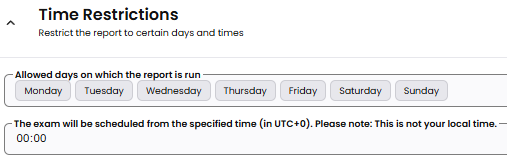
- Set the scan schedule
Here you can choose on which weekdays and at which times (UTC+0 time zone) the automatic page checks should run. The exact start time of a scan cannot be set precisely, as it depends on the current server load. - Save the settings
Once you have configured everything, click "Save settings" to apply the changes.
Why the time settings are useful
With the time settings, you can schedule report scans for periods when your website is in a representative state, for example outside of maintenance windows or during typical usage.