
Eye-Able Assist is a visual assistance programme designed to improve the readability and usability of websites for users with visual impairments.
Blind people generally use screen readers or Braille displays to access digital content. For those who do not use their own assistive software, however, flexible visual adjustments are necessary – and this is precisely where Eye-Able Assist comes in.
The software allows users to customise contrast, font sizes, spacing and other display options, enabling them to configure the visual presentation to suit their personal needs.
Eye-Able Assist was developed in close collaboration with people with disabilities and the BFW Veitshöchheim. Numerous interviews and eye-tracking tests were incorporated into the development process to ensure the needs of those affected were taken into account as effectively as possible.
Features
Eye-Able Assist is available in over 50 languages and offers a wide range of features to enhance the user experience:
-
Adaptive zoom: Enlarges the website without affecting the layout. Users can customise the font size, line spacing, word spacing and text alignment.
-
Contrast Mode: Allows the contrast on the website to be adjusted to make the text easier to read.
-
Blue Light Filter: Reduces the amount of blue light on the screen, thereby reducing eye strain, with individually adjustable intensity and colour temperature.
- Night mode: Sets all colours to a level that is gentle on the eyes, particularly when used at night.
-
Read website aloud: Reads the website aloud, with speed and volume adjustable as required. Elements can be read aloud by hovering the mouse over them or using keyboard shortcuts.
- Keyboard navigation: Enables full operation of the website via the keyboard.
-
Colour vision deficiency: Adjusts colours to support people with colour blindness or colour vision deficiencies.
-
Readable font: Sets a sans-serif font to improve readability.
Other features include a larger mouse pointer and the option to hide images, animations and sounds.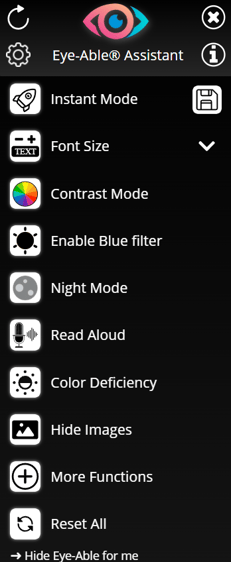
Installation and Integration
Eye-Able Assist is installed by embedding two lines of code (script tags) in the website’s header. The script is loaded asynchronously so as not to affect the website’s loading time.
The installation instructions can be found directly in the dashboard under the ‘Eye-Able Assist – Installation’ submenu.
Eye-Able Assist also offers the option to host the software directly on your own web server – without any external server connections.
Further information on integrating Eye-Able Assist can also be found in the articles in the Installation | Assist category.
Detailed instructions on hosting Eye-Able Assist locally are provided in the following article:
Customisation options
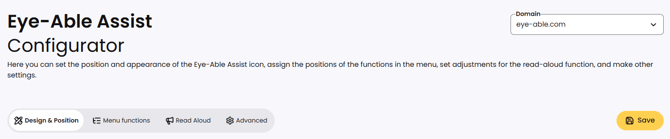
Eye-Able Assist offers numerous customisation options for the design, such as the icon size or the colours used, as well as the position of the assistive software icon. These adjustments can be made in the Assist Configurator on the dashboard. The ‘Advanced’ section also contains settings for the positioning of menu functions, the text-to-speech function and further customisation options.
Once changes have been made, they can be applied by clicking the “Save” button
Eye-Able Assist can also be embedded directly into the website’s existing navigation or other containers.
Some customisations, such as creating your own buttons, can be carried out using the Eye-Able API. For any further customisation requests, please feel free to contact our team!
Contact details for customers and interested parties
Further information on the customisation options for Eye-Able Assist can be found in the following articles and, more generally, under Configuration | Assist:
Can the Eye-Able Assist Icon be replaced with a custom icon?
Can the initial tooltip of Eye-Able Assist be changed or hidden?
Can the Eye-Able Assist Icon also be embedded directly into the page?
How do I change the position of the Assist icon on my website and the position of the functions in the toolbar?
Can I integrate Eye-Able features through custom buttons?
Technical Basis
Eye-Able Assist is developed in JavaScript and works on all modern browsers and devices, including Google Chrome, Firefox, Microsoft Edge, Safari, Opera and Tor Browser. It is integrated by adding two lines of code to the header. Eye-Able Assist uses a Shadow DOM to prevent conflicts between the website’s styles and the software’s customisations.
Users’ individual settings are stored in local storage, ensuring they are retained even after the browser is restarted. Eye-Able Assist is also supported in both desktop and mobile views.
Data Protection
Eye-Able Assist complies with data protection regulations and stores all user settings locally in the browser’s local storage. No cookies are set and no usage data is transferred to external servers. Only European partners are used for delivery via the Content Delivery Network (CDN), ensuring that no personal data is processed outside the EU.
Further information on data protection at Eye-Able Assist can be found under Data Security | Assist. This includes information on the following topics, amongst others:
Does Eye-Able Assist track user data?
Must the use of Eye-Able software be mentioned in the privacy policy?
What is the local storage used for in Eye-Able Assist?
Which entries are stored by Eye-Able Assist in LocalStorage and SessionStorage?
Should Eye-Able Assist be mentioned as a service in the consent tool (cookie banner)?