
With the Eye-Able WordPress Plugin, you can quickly and easily install your licensed products on your WordPress website. Additionally, within WordPress, you receive a direct overview of your report score for the respective licensed domain.
Supported Products
The following products can be installed using the Eye-Able WordPress Plugin:
- Eye-Able Assist – Assist
- Eye-Able Plain Language
- Eye-Able Translate
- Eye-Able Access
Difference Between the Eye-Able WordPress Plugin and the Eye-Able Assist WordPress Plugin
By integrating the Eye-Able WordPress Plugin, Assist is loaded via the Eye-Able server.
The Eye-Able Assist WordPress Plugin, on the other hand, enables local integration through hosting on your own server.
These two installation variants differ particularly in aspects relevant to data protection. Further information can be found in the Eye-Able Dashboard under Assist Privacy.
Step-by-Step Guide for Installing the Eye-Able WordPress Plugin
Step 1: Download the Plugin from the Eye-Able Dashboard
Open the Eye-Able Dashboard and navigate to Eye-Able Assist > Installation
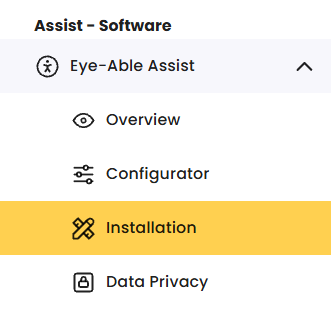
Step 2: Select the WordPress Plugin
Click on the WordPress icon in menu item 1: “Integration via the Eye-Able Server” to download the plugin.

Step 3: Open Plugin Management in WordPress
In the WordPress menu bar, open the “Plugins” menu item to access plugin management.
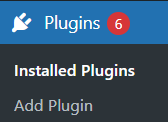
Step 4: Upload the Plugin
Click on “Add Plugins” and then on “Upload Plugin”. Upload the Eye-Able WordPress Plugin.
Step 5: Activate the Plugin
Go to “Installed Plugins”, check the plugin status, and activate it if necessary.
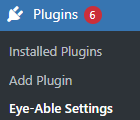
Step 6: Open Eye-Able Settings
Open the Eye-Able Settings in the WordPress plugins menu bar.
Step 7: Login
Log in using the access credentials from your Eye-Able Dashboard.
Activation of Licensed Products
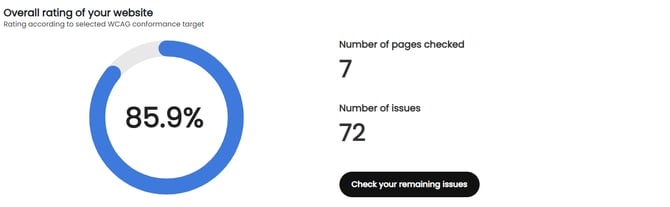
If a report license exists for your domain, you will receive an overview of your website’s overall rating from the latest report scan.
The overview shows you:
- Number of pages checked
- NUmber of found issues
Using the button “Check your remaining issues”, you can go directly to the Eye-Able Dashboard report overview.
Installation of the Products
Below the report score overview, you can activate your licensed products directly on your website using the toggle switch:
- Toggle switch active: Product can be installed
- Toggle switch inactive: No current license available
This type of integration is available for the following products:
- Assist
- Plain Language
- Translate
- Access

Please contact us if you are interested in an additional license:
How can I get in touch with you personally?
Customize Design and Settings
Using the link “click here to customize design and settings”, you can directly access the configuration options for the respective product.
Further Information
Further information about the integration options for your WordPress website can be found here:
How can I integrate Eye-Able software into my WordPress website?