
The guest function lets you give people from external organisations – for example agencies – access to your licences in the dashboard.
Access and permissions for guests
You control individually for each guest what is possible:
- Access and editing rights are set per licence.
- Admin rights can additionally be granted to or withheld from a guest. With admin rights, a guest has access to functions such as "Hide problems" or "Trigger report manually".
How to invite a guest
- In the dashboard, go to "My organisation".
- Click "Invite guest".
- Enter the guest's email address.

Important: An invitation is only possible if the guest already has an Eye-Able account.If the guest does not yet have an account, please get in touch with us via our contact options for customers and prospective customers. The account will then be created manually, after which you can invite the guest.
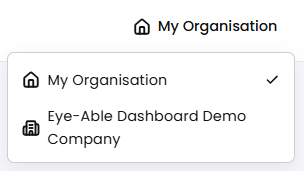
Switching to the guest organisation as a guest
Once you have added a guest, that guest can switch to your organisation – the so-called "guest organisation" – within their own account. A corresponding button is available in the account for this purpose.
Further articles
These articles will help you with related topics: