
In this article, you’ll learn how to exclude the cookie banner from automated scans with Eye-Able Report by adjusting a setting in the dashboard.
Excluding the cookie banner from automated scans
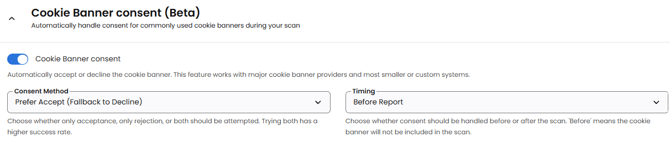
In the dashboard, navigate to the “Settings” section of the report and select “Cookie Banner consent”. There, you can enable the feature so that the cookie banner is automatically removed from the scan.
You can also choose the consent method and decide whether the cookie banner should be removed before or after the Report scan.
Further help
If removing the cookie banner doesn’t work, feel free to contact us using the contact details for customers and interested parties.